Repeating Code with while Loops
In the previous lesson, we learned how for loops repeat code over a fixed sequence.
Now, let's explore how to repeat code when we don't know the exact count in advance!
1. Why Do We Need while Loops?
A for loop is extremely useful when we know how many times we want to repeat or when we have a fixed sequence of items to process.
However, in many real-world programs, we don't know the exact number of repetitions in advance.
Real-World Examples:
- Password Retry: Keep asking a user for their password until they type it correctly.
- Video Game Lives: Keep running a game while the player still has lives remaining.
In these situations, repetition is not based on a fixed count. It is based on a rule or condition.
Key Rule: When repetition depends on a condition, we use a
whileloop.
2. What is a while Loop?
Definition: A
whileloop repeats a block of code as long as a specified condition remainsTrue.
How a while Loop Works Conceptually:
- Python checks a condition.
- If the condition is
True, Python executes the block of code inside the loop. - After finishing the block, Python jumps back to check the condition again.
- When the condition becomes
False, Python stops the loop and moves to the next lines of code.
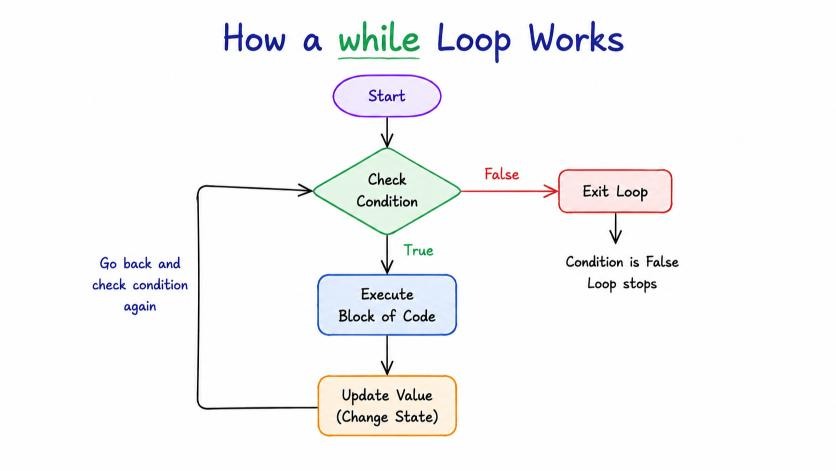
Visual Guide: Conceptual Execution Flowchart of a Python while Loop.
3. while vs for Loop
Here is a quick way to decide which loop to use:
| Feature | for Loop | while Loop |
|---|---|---|
| Primary Use | Used when we know the sequence or number of repetitions in advance. | Used when repetition depends on a condition that changes dynamically. |
| Example Scenario | Print numbers 1 to 10, or iterate through letters in "Python". | Ask for a password repeatedly until the correct one is entered. |
| Control Mechanism | Iterates over items in a sequence until the sequence ends. | Checks a boolean condition before every round until it becomes False. |
4. Understanding the Basic Structure of a while Loop
The syntax of a while loop is simple and clean:
while condition:
    block of code
Let's break down each part:
while keyword
- Starts the
whileloop instruction. - Tells Python to keep repeating the block of code as long as the condition remains
True.
condition
- A condition is a rule that evaluates to either
TrueorFalse. - Conditions are usually created using comparison operators:
>(greater than)<(less than)>=(greater than or equal to)<=(less than or equal to)==(equal to)!=(not equal to)
Simple Condition Example:
Consider the condition: lives > 0
- If
lives = 3:3 > 0→True→ The loop continues!
- If
lives = 0:0 > 0→False→ The loop stops!
block of code
- The indented lines of code (4 spaces) executed whenever the condition is
True.
Visual Anatomy & The 3 Parts of a While Loop
5. How while Loop Works Step by Step
Let's look at a video game example:
lives = 3

while lives > 0:
    print(f"Playing game... Lives remaining: {lives}")
    lives = lives - 1

print("Game Over!")
Output:
Playing game... Lives remaining: 3
Playing game... Lives remaining: 2
Playing game... Lives remaining: 1
Game Over!
Detailed Round-by-Round Execution Trace:
- Starting State:
lives = 3
Round 1:
- Condition Check:
3 > 0→True - Action: Prints
"Playing game... Lives remaining: 3" - Update Step:
lives = 3 - 1→livesbecomes2
Round 2:
- Condition Check:
2 > 0→True - Action: Prints
"Playing game... Lives remaining: 2" - Update Step:
lives = 2 - 1→livesbecomes1
Round 3:
- Condition Check:
1 > 0→True - Action: Prints
"Playing game... Lives remaining: 1" - Update Step:
lives = 1 - 1→livesbecomes0
Round 4:
- Condition Check:
0 > 0→False - Result: Loop stops! Python exits the loop and prints
"Game Over!".
Simple Mental Model:
Starting Value
      ↓
Check Condition
      ↓
Execute Block (if True)
      ↓
Update Value
      ↓
Check Condition Again
6. The 3 Essential Parts of a while Loop
Notice that every working while loop requires 3 essential parts:
- Starting Value: A variable initialized before the loop starts (e.g.,
lives = 3). - Condition: The rule checked before every iteration (e.g.,
while lives > 0:). - Update Step: A statement inside the loop that changes the variable (e.g.,
lives = lives - 1).
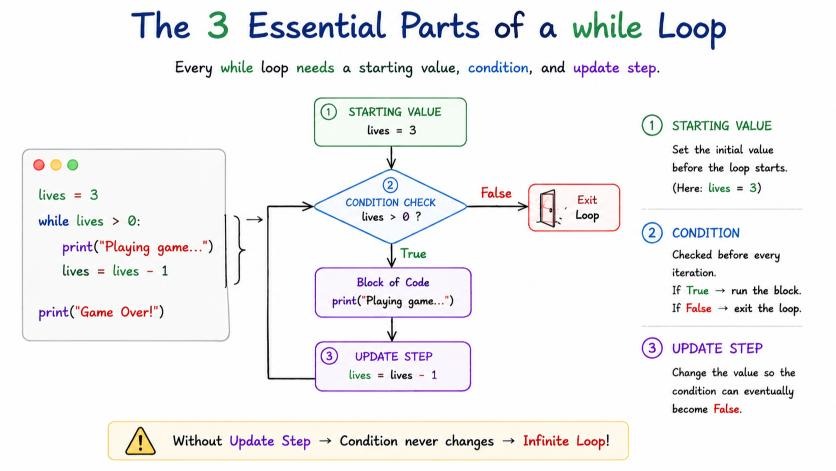
Visual Guide: The 3 Essential Parts of a Python while Loop (Starting Value, Condition, and Update Step).
Why the Update Step is Critical:
The Update Step changes the variable state so that the condition will eventually become False. Without an update step, the condition would stay True forever!
7. Real-World Example: Retrying Password
Here is another classic use case: keeping a program running until a user types the correct password.
password = ""

while password != "secret123":
    password = input("Enter password: ")

print("Access Granted!")
Why a while Loop is Perfect Here:
We don't know how many wrong guesses the user will make.
- If they type
"secret123"on attempt 1 → condition becomesFalseimmediately, loop ends! - If they take 5 attempts → loop runs 5 times until
password != "secret123"evaluates toFalse.
8. Infinite Loops (Important Warning!)
What happens if you forget Part 3 (Update Step)?
If the variable is never updated, the condition remains True forever! This is called an Infinite Loop, and it can freeze your program or crash your terminal.
# ⚠️ DANGER: Missing Update Step! Runs forever!
# counter = 1
# while counter <= 5:
#     print("Stuck inside this loop!")
#     # Forgotten: counter = counter + 1
How to Stop an Infinite Loop:
If your program gets stuck in an infinite loop:
Press Ctrl + C in your terminal to force Python to stop immediately!
Quick Summary
| Concept | Meaning |
|---|---|
while Loop | A condition-based repetition system that repeats a block of code as long as a condition is True. |
| Condition | A rule checked before every round that evaluates to True or False. |
| Starting Value | An initial variable set up before the loop starts to track the state. |
| Update Step | A statement inside the loop that changes the variable so the condition can eventually become False. |
| Block of Code | Indented lines executed repeatedly whenever the condition is True. |
| Infinite Loop | A loop that never stops because its condition stays True forever (stop using Ctrl + C). |
What's Next?
Now that we know both for loops and while loops, what if we want to stop a loop early or skip a specific round? Let's learn about break and continue in the next lesson!