Nested Loops (Loops Inside Loops)
A Nested Loop is simply a loop placed inside another loop.
1. Why Do We Need Nested Loops?
Sometimes in programming, one repeated task contains another repeated task inside it.
Real-World Examples:
- Classroom Seating: A teacher inspects Row 1 (Seats 1, 2, 3, 4), then Row 2 (Seats 1, 2, 3, 4), then Row 3 (Seats 1, 2, 3, 4).
- Cinema Theater: Movie seats are arranged in rows and seats (Row A: Seats 1 to 10, Row B: Seats 1 to 10).
- Calendar: A year has 12 months (outer loop), and each month has 30 days (inner loop).
- Multiplication Tables: Printing table numbers 1 to 10 (outer loop), where each number is multiplied by 1 to 10 (inner loop).
In all these scenarios, you have a main repeated action (rows/months), and inside each main action, you perform another repeated action (seats/days).
Key Rule: When one repeated task contains another repeated task, we use nested loops.
2. How Nested Loops Work
For every single turn of the outer loop, the inner loop runs completely from start to finish.
- Outer Loop: Controls the main round (e.g., current row).
- Inner Loop: Runs completely from start to finish for every single turn of the outer loop.
Important Rule: The inner loop always starts from the beginning every time the outer loop begins a new iteration.
Syntax Structure of Nested Loops
3. Basic Example: How Outer and Inner Loops Execute
Let's print messages showing when the Outer Loop turns vs when the Inner Loop runs:
for i in range(1, 3):         # Outer loop: i = 1, 2
    print(f"--- Outer Loop Turn: i = {i} ---")

    for j in range(1, 4):     # Inner loop: j = 1, 2, 3
        print(f"  Inner Loop Running: j = {j}")
Output:
--- Outer Loop Turn: i = 1 ---
  Inner Loop Running: j = 1
  Inner Loop Running: j = 2
  Inner Loop Running: j = 3
--- Outer Loop Turn: i = 2 ---
  Inner Loop Running: j = 1
  Inner Loop Running: j = 2
  Inner Loop Running: j = 3
Notice What Happened:
- Outer Loop Turn 1 (
i = 1):- Inner loop runs completely:
j = 1,j = 2,j = 3
- Inner loop runs completely:
- Outer Loop Turn 2 (
i = 2):- The inner loop starts again from
j = 1. It does NOT continue fromj = 4!
- The inner loop starts again from
Most Important Concept: Every new iteration of the outer loop creates a completely new execution of the inner loop from start to finish.
Now let's connect the programming execution of nested loops with a real-world example:
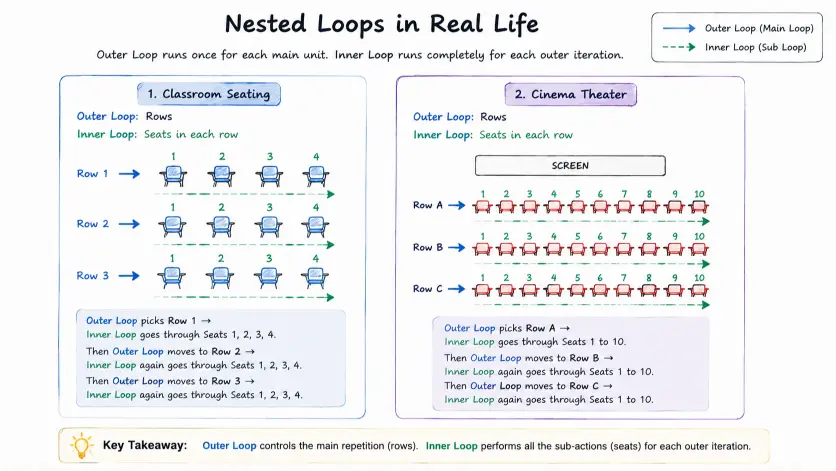
Real-world view of Nested Loops: Outer Loop controls the main repetition, Inner Loop completes all repeated tasks inside it.
4. Printing Grid Patterns (Rows & Columns)
Think of a grid like a set of rows and columns.
- The outer loop controls the rows.
- The inner loop controls the columns.
For every row, the columns are printed completely on the same line. Then, the program moves to the next line for the next row.
To keep printed items on the same line in Python, we pass end="" to print(). An empty print() afterwards moves execution to the next line:
for row in range(3):
    for col in range(3):
        print("* ", end="")     # Print star and stay on same line
    print()                     # Move to next line after completing a row
Output:
* * *
* * *
* * *
Quick Summary
| Concept | Meaning |
|---|---|
| Nested Loop | A loop placed inside another loop. |
| Outer Loop | Controls the main repetition (e.g., current row or main turn). |
| Inner Loop | Runs completely from start to finish for every single turn of the outer loop. |
| Execution Order | Every time the outer loop runs once, the inner loop resets and starts again from the beginning. |
| Common Use Cases | Grids (rows & columns), 2D tables, nested structures, and multi-level tasks. |
What's Next?
Congratulations! You now master basic loops, loop controls, and nested loops. Next, we will learn about Lists and Data Collections in Part 2!