Repeating Code with for Loops
Before writing complex programs, we need to understand how to make the computer repeat actions automatically.
1. Why Do We Need Loops?
Imagine your program needs to print "Hello Python!" 5 times on the screen.
Without loops, you have to manually copy and paste 5 lines of code. If you needed to print it 1,000 times, you would have to write 1,000 lines!
With a loop, you write the instruction once and tell Python to repeat it automatically:
Comparison: Printing 5 Times
print("Hello Python!")
print("Hello Python!")
print("Hello Python!")
print("Hello Python!")
print("Hello Python!")
for i in range(5):
  print("Hello Python!")
2. What is a Loop?
Definition: A Loop is a programming feature that automatically repeats a block of code multiple times.
What is a "Block of Code"?
A block of code is a group of code lines that belong together. In Python, code blocks are created using Indentation (4 spaces pushing the lines to the right).
Why Python Uses Indentation:
Python uses indentation to clearly understand which lines of code belong inside the loop body and should be repeated, and which lines are outside the loop and should run after the loop completes.
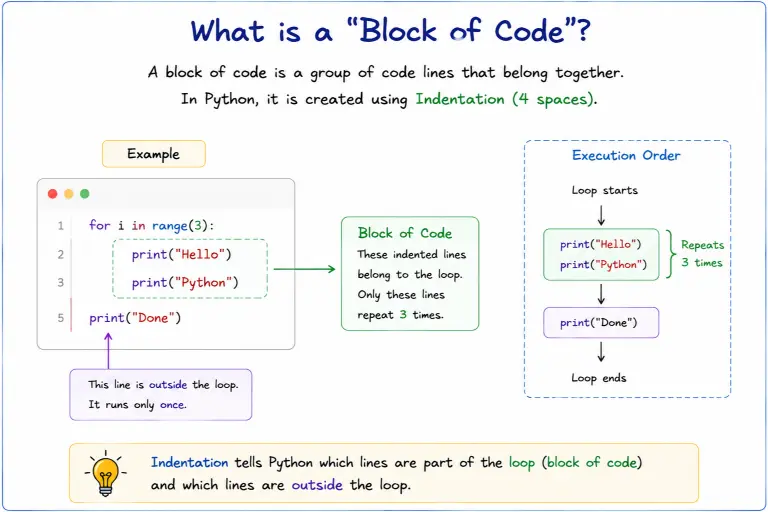
Visual Guide: Understanding Python Indentation, Block of Code, and Execution Order.
3. Introduction to for Loop
A for loop is used to process items from a sequence one by one.
Before looking at syntax or numbers, remember this key concept:
A
forloop processes items from a sequence.
Real-World Analogy:
- Fruit Basket: Imagine picking up apples from a basket one by one. You pick up Apple 1, inspect it, pick up Apple 2, inspect it... until the basket is empty.
- Teacher Taking Attendance: A teacher reads student names from a register one by one: Student 1, Student 2, Student 3... until the list ends.
In both cases, you perform an action on each item, one by one. That is exactly how a for loop works!
4. Understanding the Basic Structure of a for Loop
First, let me look at the generic structure of a for loop:
for item in sequence:
    block of code
Let me break down each part separately:
for keyword
- It is a reserved Python keyword that starts the loop instruction.
forcontrols the iteration process. It repeatedly gets the next value from the sequence, stores it in the loop variable, and executes the block of code.
item / variable
- It is a normal variable created by the programmer.
- It stores the current value during each iteration (round).
- It is not a special keyword.
iis commonly used as a short variable name, but any valid variable name can be used (e.g.,for number in range(5):).
in keyword
inconnects the loop variable with the source of values.- In simple words: it tells Python where the values should come from.
for item in sequence:means: "Take each item from this sequence and store it in the variableitem."
sequence
- A sequence is an ordered collection of items where each item has a position.
- Examples of sequences include:
- Numbers
- Strings (text)
- Lists
range()
block of code
- The indented lines of code (4 spaces) that execute repeatedly for every item in the sequence.
5. Understanding range()
Now that we understand for, variable, in, and sequence, how do we get a sequence of numbers?
A for loop needs a sequence to go through. When we want a sequence of numbers, we use range().
range()provides a sequence of numbers for theforloop to iterate through.
Example:
range(5) creates the number sequence:
0, 1, 2, 3, 4
Important:
range()only provides values. It does not perform the looping itself; theforloop performs the iteration over those values.
For example, you can store the sequence generated by range() in a variable first:
numbers = range(5)

for i in numbers:
    print(i)
range() is not directly connected only with for syntax. It creates a sequence of numbers that can be stored in a variable and later used by a for loop.
6. How for i in range() Works Step by Step
Let's trace how Python executes a for loop step by step:
for i in range(3):
    print(i)
Step-by-Step Execution:
- Step 1:
range(3)provides the sequence of values:0, 1, 2. - Step 2:
fortakes the first value0:i = 0- The block executes:
print(0)→ Output:0
- Step 3:
fortakes the next value1:i = 1- The block executes:
print(1)→ Output:1
- Step 4:
fortakes the next value2:i = 2- The block executes:
print(2)→ Output:2
- Step 5: No values are left in the sequence, so the loop stops automatically.
0
1
2
Simple Mental Model:
range()→ Provides valuesin→ Connects the loop variable with the source of valuesfor→ Controls iteration, takes values one by one, and repeats the blocki→ Stores the current valueblock→ Executes the task for each value
7. range() Variations
You can customize range() by providing different arguments:
1. range(stop)
Generates numbers starting from 0 up to (but not including) stop:
for i in range(5):
    print(i)
# Output: 0, 1, 2, 3, 4
2. range(start, stop)
Generates numbers starting from start up to (but not including) stop:
for i in range(1, 6):
    print(i)
# Output: 1, 2, 3, 4, 5
3. range(start, stop, step)
Generates numbers starting from start, stopping before stop, incrementing by step:
for i in range(2, 11, 2):
    print(i)
# Output: 2, 4, 6, 8, 10
8. for Loop is Not Limited to range()
Until now, we used range() to provide numbers to a for loop. But remember, a for loop does not care where the values come from. It only processes items one by one from a sequence.
A for loop only needs a sequence that can provide items one by one. range() is only one source of values.
A for loop can work with different sequences like:
range()(numbers)- Strings (text characters)
- Lists (collections of items)
Example 1: Using range()
for number in range(5):
    print(number)
9. Looping Through Strings
for loops are not just for numbers! Any sequence can be used with a for loop.
A String (text) in Python is an ordered sequence of individual characters.
word = "Python"

for letter in word:
    print(letter)
Output:
P
y
t
h
o
n
10. Common Beginner Mistakes
❌ Mistake 1: Thinking i is a Mandatory Keyword
- Wrong Thought: "I must write
iin every for loop." - Correction:
iis just a normal variable name. You can usefor letter in word:,for number in range(5):, or any descriptive name.
❌ Mistake 2: Forgetting Indentation
- Wrong Code:
for i in range(3):print(i) # SyntaxError!
- Correction: Always indent the loop body by 4 spaces so Python knows which code belongs inside the loop.
❌ Mistake 3: Confusing range() with the Loop Itself
- Wrong Thought: "The
range()function does the looping." - Correction:
range()provides values. Theforloop performs iteration over those values.
Quick Summary
| Concept | Meaning |
|---|---|
| Loop | A feature that automatically repeats a block of code. |
for | Python keyword that iterates over elements of any iterable sequence. |
in | Connects the loop variable with the sequence source. |
range(start, stop, step) | Generates an arithmetic progression of numbers up to (stop - 1). |
| Loop Variable | Temporary variable storing the current element in each iteration. |
| Indentation | 4 spaces required to define the loop block. |
What's Next?
A for loop repeats code over a fixed sequence. But what if you want to repeat code until a condition changes (like playing a game while you still have lives)? Let's learn about while loops next!